Beyond the purple gradient: 10 ways to make AI-built design look designed
UknowUX 4 hours ago ·
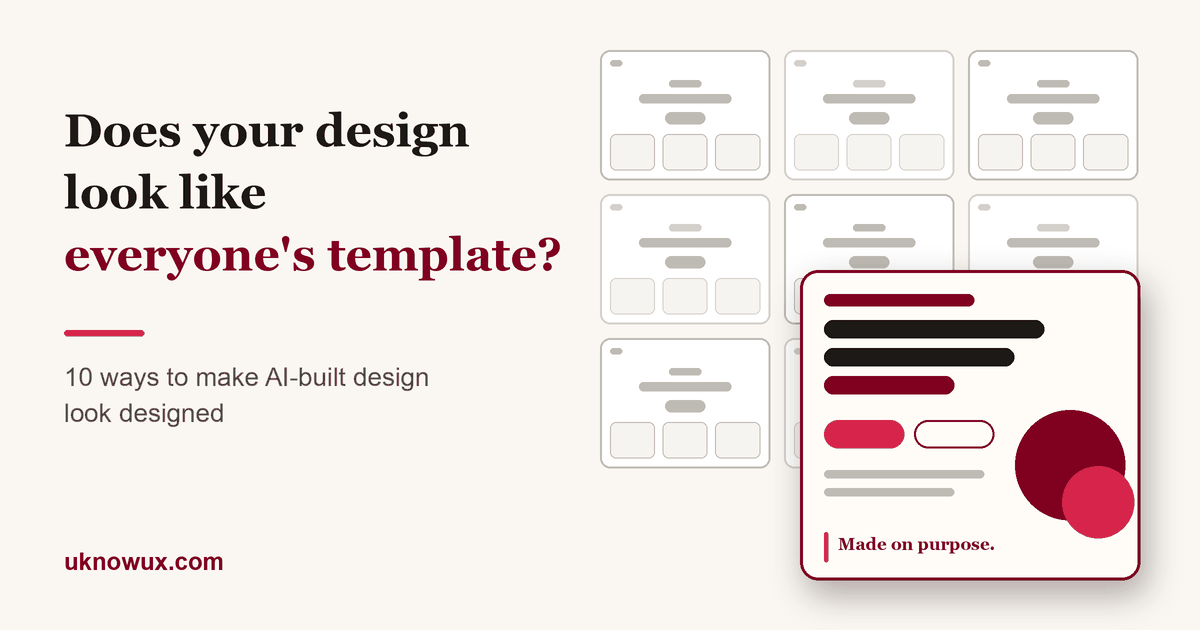
Open ten AI-built landing pages and you could almost swap the logos. The same lavender gradient, the same centred headline with a small badge above it, the same row of three rounded cards. Nothing is broken, and nothing is memorable either.
A design looks "vibe-coded" when nobody made the design decisions the AI made on their behalf. The fix is not a cleverer prompt. It is making those decisions yourself, before you generate anything and again when you review what comes back. This guide gives you ten ways to do that, the AI skills that can help with each, and a ten-minute check you can run on anything you have built.
Why does AI-built design all look the same?
Because the model is doing exactly what it was trained to do: pick the safest, most common answer. Anthropic calls this "distributional convergence" in its own write-up on front-end design: safe choices that work everywhere and offend no one dominate the training data, so a model drifts toward them unless you steer it. Its prompting guide lists the usual defaults: overused fonts such as Inter, Roboto and Arial, purple gradients on white, predictable layouts and cookie-cutter components with no character of their own.
There is a catch worth knowing. The same guide admits that models still converge on new favourites even when told to avoid the old ones (Space Grotesk is its own example). So banning a font will not save you. A point of view will.
1. Decide what it should feel like before you prompt
Most vibe-coded work starts with "build me a landing page for a budgeting app". That sentence contains no design decisions, so the model makes all of them.
- Write a five-line brief first. Who is it for, what should they feel in the first five seconds, and what is one thing it must never look like?
- Pick three adjectives and one reference. "Calm, precise, a bit playful" plus one thing you admire (a magazine, a transit map, a board game) gives the model something to aim at.
- Keep it in a file. A short design note that lives in the project and is pasted into every session stops the look drifting from one prompt to the next.
Ask your AI: "Before writing any code, restate the audience, the feeling, and three things this must not look like. Wait for my approval."
2. Choose your typeface on purpose
Type does most of the work of making a screen feel designed, and it is the first place defaults show.
- Skip the default stack. Anthropic's guidance names Inter, Roboto, Open Sans, Lato and system fonts as the usual suspects. Be wary of whatever has replaced them in every AI demo this year, too.
- Create contrast. The guidance suggests pairing opposites (a serif with a geometric sans, a display face with a monospace) and using extremes: weights like 200 against 800, and size jumps of three times or more, not 400 against 600.
- Commit to one distinctive font and use it decisively, then test it with your real headline, not "Lorem ipsum".
Ask your AI: "Propose three type pairings for this brief. For each, say what feeling it creates and show the real headline in it."
3. Commit to a colour story
"Dominant colours with sharp accents outperform timid, evenly distributed palettes" is Anthropic's own wording, and it is good design advice for humans too.
- One dominant colour, one sharp accent, plenty of neutral. If you cannot say which colour is the star, the palette is not finished.
- Derive it from something real: the product, a photograph, the brand's history, the setting it is used in. Not from the model's idea of "modern".
- Check contrast, especially in dark themes. Barely passing grey body text on near-black is one of the most common vibe-coded tells. Aim for WCAG AA at least.
4. Earn every gradient, glow and shadow
Gradients are not the problem. Gradients with no reason are. Watch for gradients behind every section, large coloured glows, and coloured box shadows on cards.
- Allow yourself one gradient, for one job, and be able to say what it is for.
- Delete the glow first, then see what you actually miss.
- Make shadows and borders neutral unless colour carries meaning.
5. Break the template
Certain layouts have become the signature of generated pages: a centred hero with a small badge above the headline, three identical feature cards with an icon on top, a numbered "1, 2, 3" steps section, a row of statistics, and cards with a coloured stripe along one edge.
- Try the logo-swap test. Cover the logo. If another product could use the page without changing a word, the layout is generic.
- Design from the content out. If your product is a map, let the map lead. If it is a long document, let the reading column lead. The structure should come from what people do, not from what pages usually look like.
- Use asymmetry and scale on purpose: one big thing, several small things, space around them.
6. Write the real words first
"Supercharge your workflow" and "Seamless experiences" are placeholder copy that never left. Generated layouts fill themselves with this language because the model has no real story to tell.
- Write the headline yourself, in plain words, naming a real person doing a real thing.
- Use real numbers, names and screenshots. One genuine product screen beats three abstract blobs.
- Read every label aloud. If a button says "Get started" and could say anything else, say the specific thing: "Plan my first month".
7. Design the unhappy paths
A generated screen is usually right for one case: five perfect items, a short name, a fast connection. Real use is messier.
- List the states before you review: empty, loading, error, offline, one item, a thousand items, a very long name, text in another language.
- Test the keyboard and check that focus is visible.
- Ask for the states by name. Models rarely volunteer them.
Ask your AI: "Show this component in empty, loading, error, long-text and 1,000-item states, and with keyboard focus."
8. Lock the system: spacing, radius and icons
Uneven spacing, text that wraps awkwardly inside a button, three different corner radii and emoji standing in for icons are the small things that make a page feel assembled instead of designed.
- Define a spacing scale, one or two radii, one icon set and a short colour list as tokens, and tell the model to use only those.
- Treat any new value as a decision, not a convenience.
- Replace emoji icons with a proper set, used at one size and one weight.
9. Make motion and accessibility part of the look
Motion and accessibility are not finishing touches. They are what makes something feel crafted.
- Spend your motion budget in one place. Anthropic's guidance puts it well: one well-orchestrated page load with staggered reveals creates more delight than scattered micro-interactions.
- Respect people who turn animation off by honouring the reduced-motion setting.
- Check target sizes, focus rings, labels and contrast as part of the design, not as a late audit.
10. Review like an art director, with a second pair of eyes
The last step is the one people skip. Do not accept the first output, and do not let the model that made it be the only reviewer.
- Squint test: blur your eyes. Can you still see what matters most?
- Five-second test: show it to someone for five seconds. Ask what it is for and what they would do next.
- Edit by removal. Delete a fifth of what is there and see what you miss.
- Use a critique pass with fresh context, from a human or a separate AI session set up as a reviewer, and ask it to find problems, not to praise.
Which AI skills help, and with what?
Skills are small instruction packs that a coding assistant loads on demand. These were the design-focused ones people used most when this guide was written (October 2026). Names, commands and contents change quickly, so check each project's page for the current install steps.
- Anthropic's
frontend-design(in theanthropics/skillsrepository). A short set of instructions that steers the model away from generic fonts, colours and motion. A good baseline to add before you generate. - Impeccable (by Paul Bakaus,
pbakaus/impeccable). Best once you have something to improve. Itsinitstep writes a product note capturing audience, purpose and voice;critique,auditandpolishreview and refine; and adetectcommand scans files against fixed rules for generic patterns without calling an AI. - UI UX Pro Max (
nextlevelbuilder/ui-ux-pro-max-skill). A library of styles, palettes, font pairings and UX guidelines. Useful when you want options to choose from instead of defaults, though a bigger library means more for the model to carry. - Vercel's
web-design-guidelines(invercel-labs/agent-skills). A checklist of interface standards for spacing, typography, interaction and accessibility. Think of it as a correctness check rather than a source of style. - The Product Designer Portfolio Review skill (by Leonardo Betti). If what you built is a portfolio, it scores a live portfolio URL the way a hiring reviewer might and lists fixes in priority order.
One honest limit: a skill nudges a model away from defaults. It does not supply taste. You still have to decide what the work should be.
A ten-minute vibe check
Run this on anything you have built with AI. Every "no" is a place to work.
- Can you describe the intended feeling in three words, and does the screen deliver it?
- Did you choose the typeface, or accept it?
- Can you name the dominant colour and the accent?
- Can you say what each gradient or glow is for?
- Would the page still make sense if the logo were covered with another company's?
- Is every headline and label written for this product, in plain words?
- Have you seen empty, error, loading and long-text states?
- Do spacing, corner radius and icons follow a defined set?
- Does the motion have one clear moment, and does it respect reduced motion?
- Has someone other than the author looked at it for five seconds?
Related reading
- See how real designers present work in UX portfolios, or preview the portfolio templates.
- Look up unfamiliar terms in the UX glossary.
- Share your own experiments in the Product Design topic, or read more in AI in UX.
FAQ
What does "vibe-coded" design mean?
It describes interfaces built quickly by prompting an AI and accepting the first result, so the design decisions (type, colour, layout, content) are the model's defaults rather than the designer's choices. The giveaways are a familiar font, a purple or indigo gradient, a centred hero with a badge, identical feature cards and generic copy.
Is it wrong to use AI to build designs?
No. AI is a fast way to explore and build. The issue is accepting its defaults. Decide the direction, constrain the output, and review the result, and AI-assisted work can look as considered as anything else.
Can an AI skill make my design look less generic on its own?
A skill helps by pushing the model away from common defaults and by giving it a checklist, but it cannot supply your point of view. Treat skills as guardrails and reviewers, and keep the decisions about feeling, type, colour and content for yourself.
Should I stop using the Inter font?
Not necessarily. Inter is a well-made typeface. It becomes a tell when it is used because it was the default and not because it fits. Choose a typeface for a reason you can state, and test it with your real content.
How do I check a page for AI-looking patterns quickly?
Cover the logo and see whether the page could belong to anyone, then run the ten-minute check above. For a more systematic pass, a critique or detection skill can scan for common patterns, but a person should always make the final call.
Sources and further reading
- Anthropic, Improving frontend design through Skills and the prompting for frontend aesthetics guide.
- Impeccable, UI UX Pro Max and the skills.sh design directory.
- Developers Digest, AI design slop: 16 patterns that mark a site as vibe-coded.
Keep learning in the Resource Library
All guides on Product Design →-
Article
A 30-day plan for your product design interview
With a month to go, the trick is not to learn everything. Spend each week on one thing: foundations, product thinking, your portfolio stories, then out-loud practice.
UknowUX guide
-
Article
Why your project thumbnails deserve more attention
Selected-work grids are full of device mockups, stock images and zoomed-out screens that say nothing. Treat the thumbnail as your first glimpse: show the work, hint at a skill, make people curious.
UknowUX guide
-
Article
Week 1: get your design foundations in shape
Research and problem framing, journeys and structure, wireframes and usability, accessibility: the base every product design interviewer expects you to reason from.
UknowUX guide
0 replies
Sign in to join the conversation.